The 3 Biggest Disasters In Budget Robot Vacuum History
페이지 정보

본문
Buying a Budget Robot Vacuum
The budget models can accomplish the job well even though more expensive robots can collect more pet hair and dirt. Be sure to check the specifications for clearance and dirt storage and whether the machine is able to connect to a home assistant like Alexa.
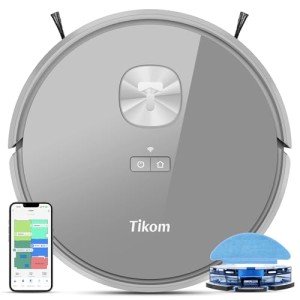 The Dreametech D10 Plus, a mid-range bot, is among the few bots under $400 that can mops and map and best auto vacuum-empty. Its tank-like wheels roll right over high transitions and obstacles like lounger chair legs that stump other bots.
Features
Before you purchase a robotic vacuum, take note of the features. While they promise to ease your burden of the chore of cleaning floors manually, there are a few things to be aware of. This includes battery life as well as scheduling and navigation. It is also important to know whether the robot vacuum or mop is user-friendly and requires minimal maintenance. For instance, you should clean the dustbins after each cleaning session and wash the mop's pad on a regular schedule to prevent dirt from accumulating around your home.
Budget robot vacuums usually offer basic functionality without advanced features that are more expensive. They don't have the same features for mapping as the more expensive models, but they are still able to keep your home clean. They don't employ cameras or other high-tech sensors to navigate your home, but they can usually detect walls and furniture and move from room to room with ease. They also come with a range of cleaning modes that will meet your requirements.
If you're looking for a low-cost robot vacuum that does the job, consider the iLife V3s Pro. It's an innovative design that uses a small suction opening to scoop up debris instead of a traditional rotating brush. This design stops hairs and carpet threads from getting stuck in the brushes, and helps in cleaning. It also comes with two side brushes and three bristles that push hair and dirt into the suction opening. The iLife V3s Pro has onboard buttons and an IR remote control vacuum cleaner that makes it simple to use. It doesn't have Wi-Fi so it's a good option for those who aren't sure to have internet-connected devices at home.
If you want a more sophisticated robotic floor vacuums vacuum, try the $1,300 Dreame L40 Ultra. It comes with an forward-facing camera that lets it perform better than its rivals in getting around obstacles like power cables and cats. It can even identify messes and adjust its cleaning settings.
Suction power
It is crucial to take into consideration the suction power when choosing a robot. The amount of suction that a automatic vacuum cleaner has depends on the design and build quality, as well as the size of its dust collector. The more dirt and dust that accumulates in the dust bin, the less effective its suction will be. It is important to empty the bin as soon as possible and clean the filter, as well as other parts, on a regular basis.
The suction power is measured in units known as PA (Pascal Pressure Unit). The more powerful the Pa rating, the better the vacuum's performance. A mid-range model with 1500-2500 Pa will meet most home cleaning needs and will take care of daily dust particles like dust balls breadcrumbs, chips, and pet hairs. If you have a lot of carpets or rugs in your home, you might want to opt for a higher-end robotic vacuum with the highest suction power of 6,000 Pa.
To get the most effective results from your robot vacuum, make certain to clean it regularly. This includes removing tangled hairs from the brushes and wheels and washing the filters on a regular basis and removing lint from the brushes. It is also important to keep the battery to its maximum. The robot will stop and return to the base to recharge if the battery is low. This could leave your floors filthy and dusty.
When selecting a vacuum robot take into consideration the level of noise. Louder machines can irritate your family members more due to their constant sound. If you're on a tight budget you should look for a machine with an average noise level of 70 decibels or less. This is comparable to your neighbor's lawnmower or your normal conversations at home.
Navigation
Look for a robot best automatic vacuum cleaner that has navigational capabilities if you want to get one within your budget and capable of not getting stuck in shoelaces, cables or socks. Some models come with a map that helps them navigate around your home and clean the rooms thoroughly. Some models have obstacle avoidance that can help the robot to avoid items like furniture and cables.
Verify that the robot is Wi-Fi capable. Most smart robots use a Wi-Fi connection to connect to the Wi-Fi network in your home and control them with an app or voice commands. You will learn more about the connection of your robot in the manual or on the manufacturer's website.
The majority of budget robots have a smaller dust bin, which means they'll need to be emptied often. Some robots have self-emptying base which allows for a faster process. It is important to review the specifications to determine the size of the bin and the type of dirt that it can handle.
Some robots are capable of mopping as well as vacuuming. This is especially helpful when there is a lot of spilled drinks and food. The iLife V3s Pro, for instance, comes with a 3-in-1 feature that lets you simultaneously vaccum and mops a room or a group of rooms in an established sequence. The V3s Pro has an iHome App that lets you create no-go zones within the app and to customize cleaning settings. It also distinguishes between hard and carpet flooring, and increase suction power in line with the flooring type. The eufy L60 is an identical robot, however it doesn't have the fast LIDAR mapping sensor as the V3s Pro.
Batteries
Rechargeable batteries are essential to power a robot vacuum. Most of them are lithium-ion batteries, which have a long charge cycle and can store a huge amount of energy in relation to their weight and size. They are found in many consumer electronics, such as laptops and smartphones, but also robot vacuums. To prolong their lifespan and increase their performance, it is essential to take proper care of these batteries.
A majority of older robot vacuums utilize Nickel-metal-hydride batteries. These batteries last less and lower charging cycles compared to lithium-ion. Modern models use lithium-ion battery technology, which provides longer runtimes and is more efficient in terms of energy use. These batteries are more expensive but they are a worthwhile investment if you're hoping to get the most value of your robot vacuum.
The life of your battery is contingent on numerous factors, including how often you use your robot as well as the conditions under the environment in which it is stored. To avoid charging too much your robot's battery, keep it at around 50% charge. To ensure optimal performance it's a good idea also to replace your battery at least every two years.
Some of the latest budget robots feature Smart Robot (https://clubwings.ru) capabilities that optimize their cleaning capabilities and battery consumption. For instance, some automatically pay attention to areas that are frequented by traffic and decrease suction or mop scrubbing within these areas to conserve energy. Other features include virtual barriers, which allow you to instruct your robot to clean specific areas and not do so in other and Eco modes which lower the robot's sound level and power consumption.
Charge your robot to around 50%, and then switch it off when you are storing it for a long period of time. Keep it in a dry, cool area. Also, ensure that you clean the filters and wheels regularly.
Cost
When choosing a robot vacuum for your home, it is important to weigh the price against features that are important. Some people may be willing spend more money on a vacuum that has mopping capabilities, as it can help with debris removal and leave floors looking shinier. While this is a reasonable expectation it is important to note that the combination of robot vacuum and mop tends to be more expensive than stand-alone models.
Another factor to consider is the type of flooring in your home. If there are carpets on the walls, select a cleaner with a strong suction. It must also have a lower threshold for carpets to avoid the machine getting tangled. Also, make sure that the device has the highest suction power, usually identified by the word "Pa," and see if it can adjust to different types of flooring.
Some robots include an app with a map and a schedule in the app, which can cut down time by automating your routine cleaning. These extras are expensive.
If you're on a tight budget, go with an affordable model. It'll provide you with the features you require for a fraction of the cost. The iLife V3s Pro, for example, is one of the most affordable robot vacuums available and comes with a lot of useful features. It also has an impressive cleaning performance. It also helps avoid falling over furniture and cords.
Some budget robotic cleaners don't have Wi-Fi, which can make them difficult to control using an app on mobile devices or voice commands. If this is a breaker, consider an alternative such as the Yeedi Vac 2 Pro or Dreame D10 Plus. The former comes with a huge bin and great suction capabilities, while the one with a self-emptying platform mixed brush, as well as obstacles-avoiding on the front with line-lasers.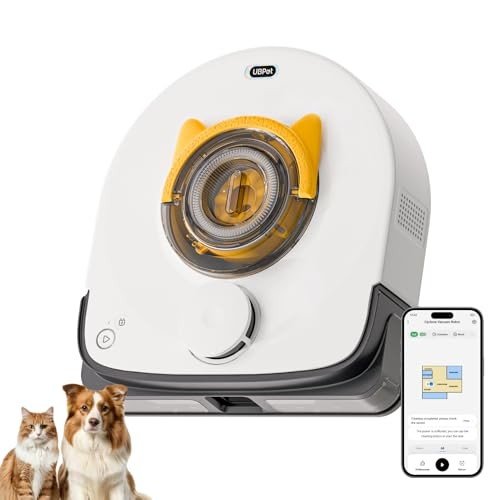
The budget models can accomplish the job well even though more expensive robots can collect more pet hair and dirt. Be sure to check the specifications for clearance and dirt storage and whether the machine is able to connect to a home assistant like Alexa.
The Dreametech D10 Plus, a mid-range bot, is among the few bots under $400 that can mops and map and best auto vacuum-empty. Its tank-like wheels roll right over high transitions and obstacles like lounger chair legs that stump other bots.Features
Before you purchase a robotic vacuum, take note of the features. While they promise to ease your burden of the chore of cleaning floors manually, there are a few things to be aware of. This includes battery life as well as scheduling and navigation. It is also important to know whether the robot vacuum or mop is user-friendly and requires minimal maintenance. For instance, you should clean the dustbins after each cleaning session and wash the mop's pad on a regular schedule to prevent dirt from accumulating around your home.
Budget robot vacuums usually offer basic functionality without advanced features that are more expensive. They don't have the same features for mapping as the more expensive models, but they are still able to keep your home clean. They don't employ cameras or other high-tech sensors to navigate your home, but they can usually detect walls and furniture and move from room to room with ease. They also come with a range of cleaning modes that will meet your requirements.
If you're looking for a low-cost robot vacuum that does the job, consider the iLife V3s Pro. It's an innovative design that uses a small suction opening to scoop up debris instead of a traditional rotating brush. This design stops hairs and carpet threads from getting stuck in the brushes, and helps in cleaning. It also comes with two side brushes and three bristles that push hair and dirt into the suction opening. The iLife V3s Pro has onboard buttons and an IR remote control vacuum cleaner that makes it simple to use. It doesn't have Wi-Fi so it's a good option for those who aren't sure to have internet-connected devices at home.
If you want a more sophisticated robotic floor vacuums vacuum, try the $1,300 Dreame L40 Ultra. It comes with an forward-facing camera that lets it perform better than its rivals in getting around obstacles like power cables and cats. It can even identify messes and adjust its cleaning settings.
Suction power
It is crucial to take into consideration the suction power when choosing a robot. The amount of suction that a automatic vacuum cleaner has depends on the design and build quality, as well as the size of its dust collector. The more dirt and dust that accumulates in the dust bin, the less effective its suction will be. It is important to empty the bin as soon as possible and clean the filter, as well as other parts, on a regular basis.
The suction power is measured in units known as PA (Pascal Pressure Unit). The more powerful the Pa rating, the better the vacuum's performance. A mid-range model with 1500-2500 Pa will meet most home cleaning needs and will take care of daily dust particles like dust balls breadcrumbs, chips, and pet hairs. If you have a lot of carpets or rugs in your home, you might want to opt for a higher-end robotic vacuum with the highest suction power of 6,000 Pa.
To get the most effective results from your robot vacuum, make certain to clean it regularly. This includes removing tangled hairs from the brushes and wheels and washing the filters on a regular basis and removing lint from the brushes. It is also important to keep the battery to its maximum. The robot will stop and return to the base to recharge if the battery is low. This could leave your floors filthy and dusty.
When selecting a vacuum robot take into consideration the level of noise. Louder machines can irritate your family members more due to their constant sound. If you're on a tight budget you should look for a machine with an average noise level of 70 decibels or less. This is comparable to your neighbor's lawnmower or your normal conversations at home.
Navigation
Look for a robot best automatic vacuum cleaner that has navigational capabilities if you want to get one within your budget and capable of not getting stuck in shoelaces, cables or socks. Some models come with a map that helps them navigate around your home and clean the rooms thoroughly. Some models have obstacle avoidance that can help the robot to avoid items like furniture and cables.
Verify that the robot is Wi-Fi capable. Most smart robots use a Wi-Fi connection to connect to the Wi-Fi network in your home and control them with an app or voice commands. You will learn more about the connection of your robot in the manual or on the manufacturer's website.
The majority of budget robots have a smaller dust bin, which means they'll need to be emptied often. Some robots have self-emptying base which allows for a faster process. It is important to review the specifications to determine the size of the bin and the type of dirt that it can handle.
Some robots are capable of mopping as well as vacuuming. This is especially helpful when there is a lot of spilled drinks and food. The iLife V3s Pro, for instance, comes with a 3-in-1 feature that lets you simultaneously vaccum and mops a room or a group of rooms in an established sequence. The V3s Pro has an iHome App that lets you create no-go zones within the app and to customize cleaning settings. It also distinguishes between hard and carpet flooring, and increase suction power in line with the flooring type. The eufy L60 is an identical robot, however it doesn't have the fast LIDAR mapping sensor as the V3s Pro.
Batteries
Rechargeable batteries are essential to power a robot vacuum. Most of them are lithium-ion batteries, which have a long charge cycle and can store a huge amount of energy in relation to their weight and size. They are found in many consumer electronics, such as laptops and smartphones, but also robot vacuums. To prolong their lifespan and increase their performance, it is essential to take proper care of these batteries.
A majority of older robot vacuums utilize Nickel-metal-hydride batteries. These batteries last less and lower charging cycles compared to lithium-ion. Modern models use lithium-ion battery technology, which provides longer runtimes and is more efficient in terms of energy use. These batteries are more expensive but they are a worthwhile investment if you're hoping to get the most value of your robot vacuum.
The life of your battery is contingent on numerous factors, including how often you use your robot as well as the conditions under the environment in which it is stored. To avoid charging too much your robot's battery, keep it at around 50% charge. To ensure optimal performance it's a good idea also to replace your battery at least every two years.
Some of the latest budget robots feature Smart Robot (https://clubwings.ru) capabilities that optimize their cleaning capabilities and battery consumption. For instance, some automatically pay attention to areas that are frequented by traffic and decrease suction or mop scrubbing within these areas to conserve energy. Other features include virtual barriers, which allow you to instruct your robot to clean specific areas and not do so in other and Eco modes which lower the robot's sound level and power consumption.
Charge your robot to around 50%, and then switch it off when you are storing it for a long period of time. Keep it in a dry, cool area. Also, ensure that you clean the filters and wheels regularly.
Cost
When choosing a robot vacuum for your home, it is important to weigh the price against features that are important. Some people may be willing spend more money on a vacuum that has mopping capabilities, as it can help with debris removal and leave floors looking shinier. While this is a reasonable expectation it is important to note that the combination of robot vacuum and mop tends to be more expensive than stand-alone models.
Another factor to consider is the type of flooring in your home. If there are carpets on the walls, select a cleaner with a strong suction. It must also have a lower threshold for carpets to avoid the machine getting tangled. Also, make sure that the device has the highest suction power, usually identified by the word "Pa," and see if it can adjust to different types of flooring.
Some robots include an app with a map and a schedule in the app, which can cut down time by automating your routine cleaning. These extras are expensive.
If you're on a tight budget, go with an affordable model. It'll provide you with the features you require for a fraction of the cost. The iLife V3s Pro, for example, is one of the most affordable robot vacuums available and comes with a lot of useful features. It also has an impressive cleaning performance. It also helps avoid falling over furniture and cords.
Some budget robotic cleaners don't have Wi-Fi, which can make them difficult to control using an app on mobile devices or voice commands. If this is a breaker, consider an alternative such as the Yeedi Vac 2 Pro or Dreame D10 Plus. The former comes with a huge bin and great suction capabilities, while the one with a self-emptying platform mixed brush, as well as obstacles-avoiding on the front with line-lasers.
- 이전글15 Up-And-Coming Double Glazing Door Hinges Bloggers You Need To Watch 25.03.31
- 다음글10 Reasons Why People Hate Vegan Leather Sofa Vegan Leather Sofa 25.03.31
댓글목록
등록된 댓글이 없습니다.

